
Mobile fuel-recovery website
A bold Melbourne identity, interactive advice and mobile contact controls.
Mobile fuel-recovery website
A bold Melbourne identity, interactive advice and mobile contact controls.
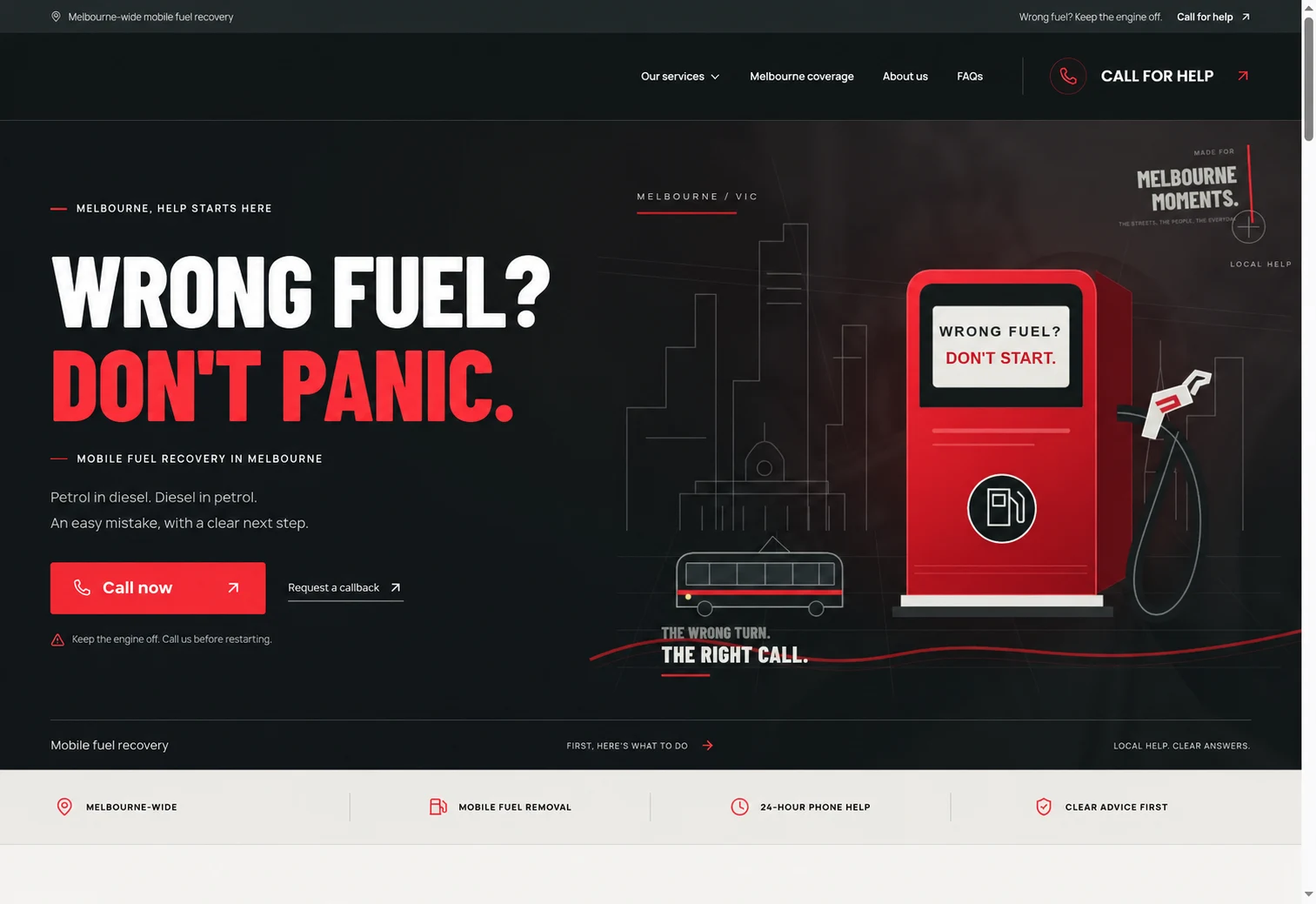
An emergency service website has to do more than look good. This redesign combines a distinctive Melbourne visual identity with immediate phone access, practical advice and a clear callback journey.
Project Website redesign · 12 pages Platform WordPress + Elementor UX focus Calls, guidance & useful enquiries Service area Melbourne, Victoria
The features behind
the experience.
Distinctive visual identity
An illustrated petrol bowser, tram and skyline make the Melbourne setting part of the design.
02 / DESIGN FEATUREImmediate contact routes
Prominent phone and callback controls appear in the places an urgent visitor is likely to need them.
03 / DESIGN FEATUREInteractive guidance
An engine-status switch presents the next step that relates to the visitor’s situation.
04 / DESIGN FEATUREA structured service journey
Separate fuel-problem pages, coverage tabs, FAQs and advice support more considered enquiries.
Let’s Get to Know You
Advice that changes with the driver’s situation.
The engine-status toggle separates two different needs: a driver still at the bowser and someone who has already started or driven the vehicle.
The selected panel changes the guidance and keeps the call action close to it. Visitors can find the relevant first step without working through a long explanation.
Interactive guidance in the live website, with “I’ve already driven” selected.The phone number stays within reach.
On a phone, the main job is making help easy to contact. The mobile layout keeps the message readable, reduces navigation to a clear menu and adds a fixed call and callback bar.
Contact while scrolling
A persistent bottom bar keeps calls and callback requests available as visitors read.
Less searching through menus
Dedicated fuel-problem routes, local coverage and FAQs give the visitor clear choices.
Readable, focused sections
Typography, spacing and stacked content adapt to a narrow screen.
A callback with the right context.
The WPForms enquiry asks for the details the team needs to begin a useful conversation: contact information, suburb, fuel problem and whether the engine has run.
Relevant details up front
Fuel type and engine status sit alongside the suburb and contact details.
A clear confirmation
The dedicated thank-you page confirms receipt and keeps the urgent number available.
Visible privacy information
The form explains how the enquiry will be used before the visitor submits.
A practical foundation
behind the design.
Editable page content
Native headings, images, buttons and sections keep routine page updates within WordPress and Elementor.
WPFormsA structured enquiry
The form collects relevant details, with required fields, privacy information and a dedicated acknowledgement page.
Rank MathA clear search structure
Service and area pages are supported by page titles, descriptions, canonical URLs and sitemap settings.
Make the right
first impression.
Tell us about your services, customers and the actions your website needs to support.
Discuss my website Explore the live project ↗Design features documented in the source. Conversion, revenue and advertising improvements are not claimed for this design.