
Electrical services website
Distinct service routes, prominent calls and a quote form built around the job.
Electrical services website
Distinct service routes, prominent calls and a quote form built around the job.
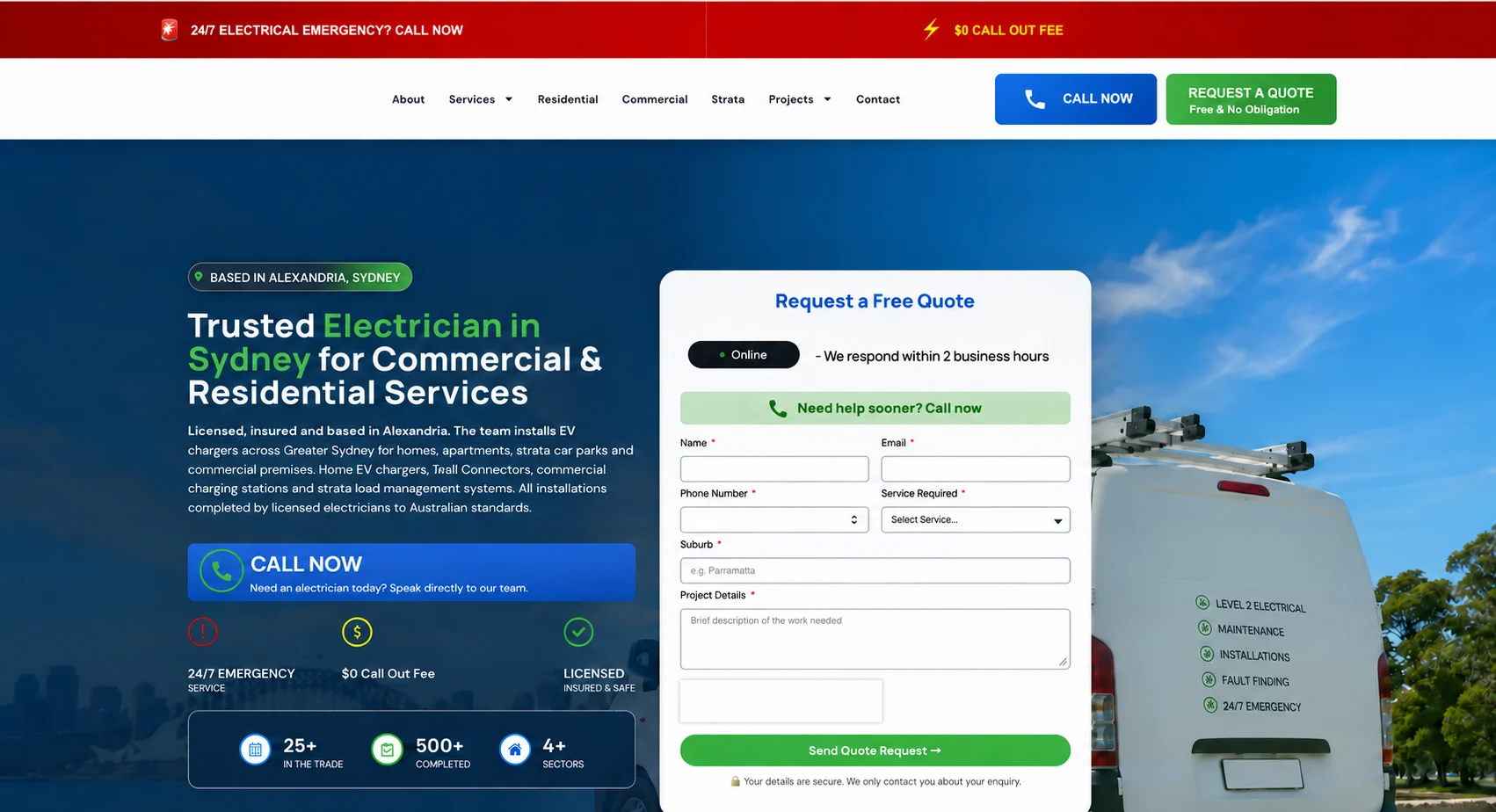
An electrical website has to support both urgent calls and planned projects. Electrical services website introduces the service areas clearly and pairs immediate phone access with a structured quote request for residential, commercial and strata work.
Project Website design Industry Electrical services UX focus Service choice → call or quote Location Alexandria & Greater Sydney
The features behind
the experience.
Two distinct contact routes
Call now and Request a quote sit together in the header, matching different levels of urgency.
02 / DESIGN FEATUREClear customer pathways
Residential, Commercial and Strata are explicit navigation choices.
03 / DESIGN FEATUREA quote beside the opening
The desktop design places the enquiry panel next to the service introduction.
04 / DESIGN FEATUREJob information up front
The form asks for service required, suburb and project details alongside contact information.
Let’s Get to Know You
Different jobs deserve clear routes.
Homeowners, facilities teams and strata managers arrive with different tasks. The navigation gives these customer groups their own starting points, with additional routes to specific electrical services.
Service cards expand those choices into work such as switchboards, data cabling, lighting and EV charging. A visitor can explore the relevant service before deciding how to contact the team.
01 / VISITOR JOURNEYChoose the service route
Begin with a customer group or the electrical task required.
02 / VISITOR JOURNEYRead the relevant detail
Explore the scope and service information before making contact.
03 / VISITOR JOURNEYCall or request a quote
Use the urgent phone route or provide the job details online.
Call and quote stay easy to tell apart.
On a phone, the menu is compact and the two contact choices sit directly beneath it. The opening content stacks into a single reading order, with the phone action visible again in the service introduction.
Contact before the scroll
Call now and Request a quote appear together near the top of the screen.
A compact service menu
The wider navigation is collected behind a clear menu control.
A readable content order
Location, service message, explanation and contact action follow one another on a narrow display.
Build the enquiry around the job.
The online quote form pairs contact details with the service required, suburb and project description. The page also provides a phone route for visitors who need to discuss an urgent issue.
A useful service choice
A dropdown lets visitors identify the electrical work they are asking about.
Location with the request
The suburb field puts service-area context alongside the job.
Room to explain
Project details give visitors space to describe the task before the team follows up.
The enquiry pathway 01Choose the service route
Begin with a customer group or the electrical task required.
02Read the relevant detail
Explore the scope and service information before making contact.
03Call or request a quote
Use the urgent phone route or provide the job details online.
A clear purpose
behind the design.
A recognisable trade identity
Blue and green accents carry the logo colours through the service introduction and contact controls.
Information designCustomer groups made explicit
Residential, commercial, strata and specific service routes give a wide offering a navigable structure.
Enquiry architectureUrgency has its own route
Phone access supports urgent conversations while the form collects planned-work details.
Make the right
first impression.
Tell us about your services, customers and the actions your website needs to support.
Discuss my website Explore the live project ↗Design features documented in the source. Conversion, revenue and advertising improvements are not claimed for this design.